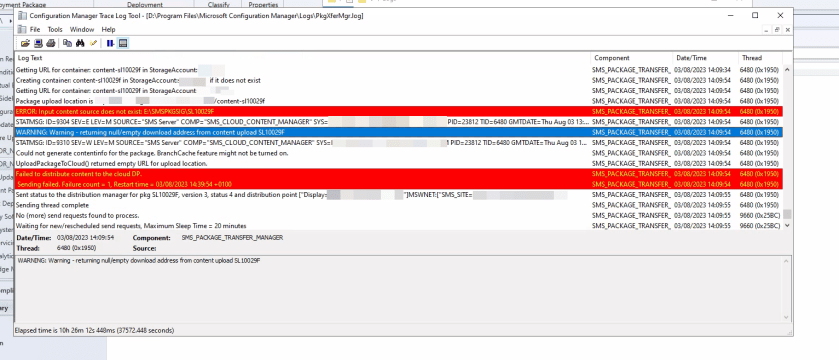
Setting up a migrated ConfigMgr instance on Server 2022 for a customer and noticed that the Software Update deployment packages were failing when attempting to upload content to the Cloud Management Gateway.
A quick Google on the error stated that it could be related to Branch Cache or we shouldn’t be uploading Software Update content to the CMG in the first place.
The problem had a simple resolution in the end and I thought I would call it out in case anyone else gets this.
As stated, the PkgXferMg.log reported Warning – returning null/empty download address from content upload <packageID>

I noted the error Input content source does not exist: E:\SMSPKGSIG\SL10029F and indeed this was true, the folder did not exist.

The content status of the package reported OK for internal DP’s but not the CMG.

The root cause was that the deployment package did not contain any members, basically we had not set up the third party patching solution as yet post migration. So it seems that the CMG trigger that error in the PkgXferMg.log file, whereas the internal DP’s will blindly accept this and carry on with their business reporting back as successful.

I hope this helps someone in a similar situation.
 SCCMentor - Paul Winstanley